
Hopper Ed

Math practice that remembers every student.

Keep your curriculum. Hopper gives each student problems at the right level, brings old skills back, and shows you who may need your attention.

Grades 1–12 · Free during beta · No student emails needed

One class, many math histories

A student can be ready for harder geometry, shaky on fractions, and starting to forget percents, all at once. Hopper keeps a separate memory for every student and every topic. You keep teaching the class; Hopper handles the thousands of small decisions about what each student practices next.

Stretch ahead, and look back

Most math apps march forward and check topics off for good.

Hopper moves each student up as soon as they're ready, and brings mastered topics back a few days later, then a few weeks later. Missed problems come back for another try.

Topics mixed, not in blocks

Most math apps serve a set of fractions, then a set of geometry: twenty look-alike problems in a row.

Hopper picks every problem fresh and mixes topics, so students can't coast on a pattern. Mixed practice feels harder, and research shows it sticks better.

Every topic at its own pace

Most math apps give a child one level, often from a single placement test.

Hopper keeps a separate level for every topic and adjusts it with every answer, so a strength can race ahead while a weaker topic gets more time.

Challenging, never discouraging

Most math apps answer a mistake with a sound and a lower score.

Students never see a score in Hopper, so a mistake costs nothing. Problems are pitched to get about 85% right, and after two misses in a row Hopper serves one they can win. You see the progress on your dashboard.
Keep the curriculum you trust

Hopper is a practice tool, not a curriculum and not a replacement for a teacher. Use it after you've introduced a concept: independent practice, homework, centers, tutoring or review. It follows the Common Core topics, so it sits beside your sequence.

1

Add your class

Paste a list of nicknames and Hopper creates every student account at once, then prints a login card for each one. No student emails, and no real names outside your dashboard.

2

Choose the guardrails

Set the starting grade, choose which games are allowed, and assign a topic when it matches your lesson.

3

Let Hopper adapt

Each student gets problems based on their own history while you teach the rest of the room.

4

See the whole class

One screen shows who practiced, the topics several students are missing, and who may need your attention. Click a student for the full picture.

Your class at a glance

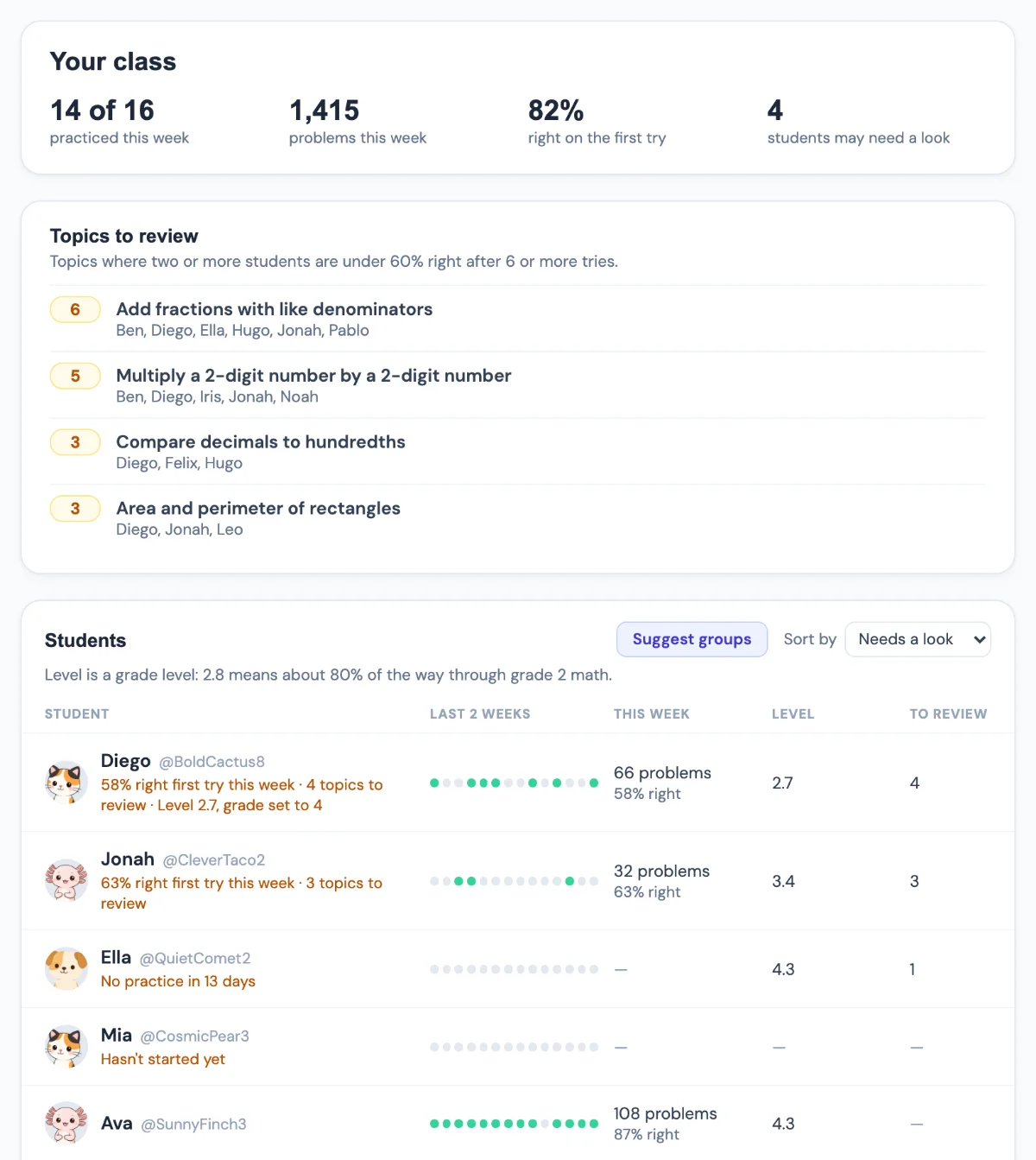
Open your dashboard and the whole class is on one screen: who practiced this week, which topics several students are stuck on, and which students may need a closer look. Click any student for their full history.

Class dashboard for a grade-4 class: 14 of 16 students practiced this week, topics several students need to review with their names, and a student list where students who may need a look are flagged and sorted to the top.
Students who may need a look sort to the top, with the reason spelled out.
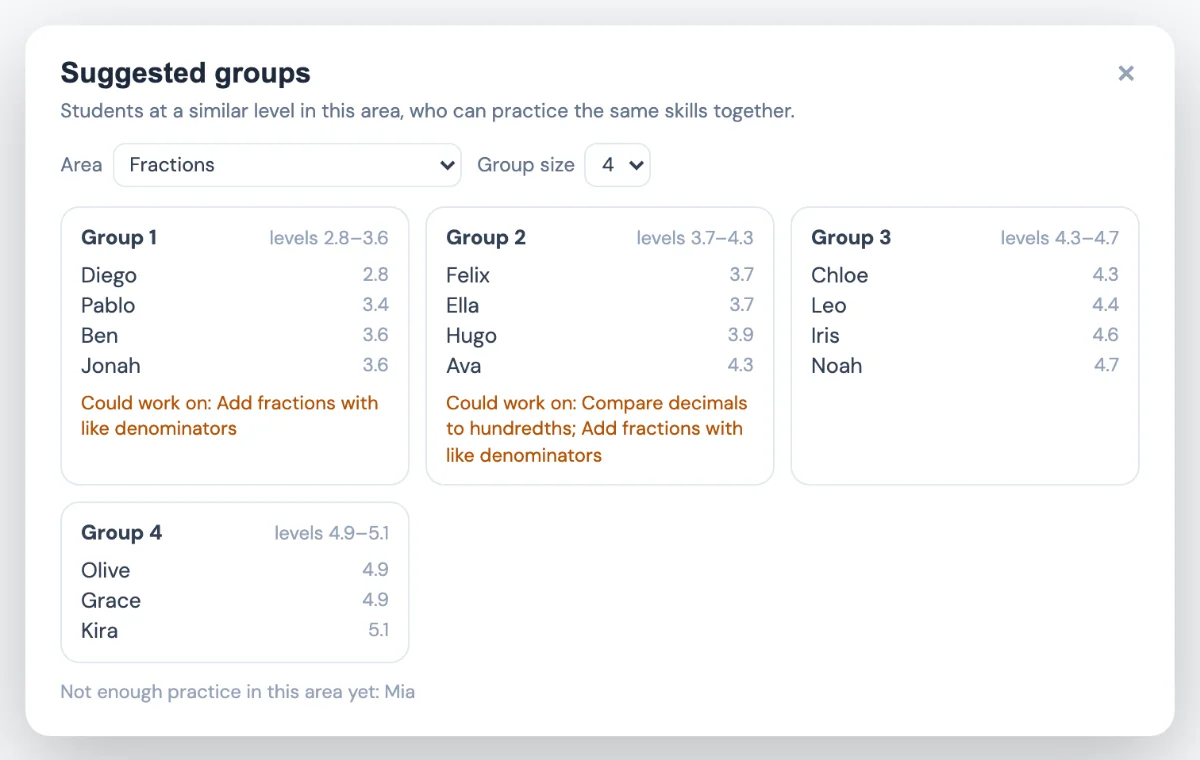
Suggested groups for fractions: four groups of students at similar levels, each with the review topics its members share.
  • Topics to review across the class, with the students who share each one, so you know what to reteach.
  • Who may need a look: no practice this week, a lot of misses, several topics to review, or working well below grade.
  • Suggested groups of students at a similar level in fractions, geometry or any other area, with the skills each group could work on together.
  • Every student in detail: progress by topic, recent sessions and missed problems, mastered and paused topics.
  • Point the practice. Assign a specific topic, or a whole area like fractions and let Hopper pick the level.

Building next: assignments for a whole class or group, and class codes so students can join on their own.

Teachers should help decide what gets built. If something essential is missing, I want to hear it.

Tell me what your class needs →

Room for every kind of math kid

Some students want a game. Some want to finish the math without one. Some light up when an unusual puzzle appears. Hopper has room for all three.

Math-circle puzzles

Water jugs, burning ropes, Make 24, magic squares, cryptarithms, area mazes and more, mixed into everyday practice. See the puzzles

Contest math and physics

Competition-style problems from grade 4, and spiraled physics from grade 9 that keeps every topic coming back. About the physics

Games, or Math Only

Solved problems earn the moves in six games. Games can be restricted for each student, and Math Only is always available.

Before you try Hopper with students

Is Hopper a curriculum?

No. Hopper is a practice tool for concepts you've already introduced. It follows the Common Core topics and is designed to sit alongside your curriculum.

What grades and courses does Hopper cover?

Grades 1 through 8, then Math I, Math II, Math III and Precalculus, plus optional contest math and physics.

Do students need email addresses?

No. You paste a list of nicknames, Hopper creates the accounts, and you print a login card for each student with their username and password.

Who can create a teacher account during the beta?

Educators in the United States who are authorized to use educational tools with their students.

Can I assign what my class is studying?

Today you can assign a specific topic to a student, or a whole area like fractions and let Hopper pick the level. Assigning to a whole class or group at once is coming next.

Does Hopper connect to Google Classroom or a district system?

Not yet. The beta uses Hopper accounts and a roster you paste in. Tell us which integrations matter to you.

How much does it cost?

Hopper is free during beta. Teachers will get clear notice before any pricing changes.

What about student privacy?

No ads and no trackers. Student answers and progress are used to choose practice and report progress, never to target advertising, and teachers can delete student accounts at any time. Read the plain-language privacy policy.